
To install additional HDRI backgrounds for rendering in PodiumxRT, simply place them into the appropriate folder on Windows:
C:\Users\Username\AppData\Roaming\SketchUp\SketchUp 20xx\SketchUp\Plugins\PodiumxRT\PWapp\Backgrounds
On the Mac, open the the file you need to open is a the PodiumxRT.app file to locate the Backgrounds folder.
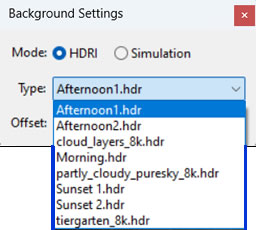
Note: In Windows AppData is often hidden by default. Read here if you don’t know how to view hidden folders.
Note: On the Mac The User/Library / Application Support folder where the Sketchupxx/plugins folder is located is always hidden.
Follow this method toshow the package contents of the PodiumxRT.app to locate the background folder
- Open Finder and open your User directory
- Press Cmd + Shift + Period (.) to show hidden files.
- In your user account folder, go to Library (will look greyed out)/ Application Support/ SketchUp 202x/ Plugins/ PodiumxRT/
- Open the PodiumxRT folder and you will see several files. One should be named PodiumxRT.app or simply maybe named PodiumxRT
- Right click on this folder and select Show Package Contents
- Go to Contents —>Resources—>Backgrounds
Backgrounds folder is where you want to save additional .hdr files


Leave A Comment